SC4S and rsyslog can both receive syslog, but they solve different parts of the problem.
Splunk Connect for Syslog (SC4S) recognizes many supported products, assigns Splunk metadata, and delivers events through HTTP Event Collector (HEC).
rsyslog can write the same events to managed files, and a Splunk Universal Forwarder (UF) or Heavy Forwarder (HF) can monitor those files and send them to Splunk. rsyslog can also retain files, relay messages, or feed non-Splunk destinations.
Splunk therefore does not make the decision for you. The real choice is between SC4S’s source-aware HEC pipeline and a file-based pipeline that your team builds with rsyslog and a Splunk forwarder.
Outcome
By the end of this guide, you will be able to choose the right starting point for your environment and explain the decision in operational terms—not merely say that one tool was already installed.
No system is changed in this article. The SC4S and rsyslog builds will be covered separately so each deployment can be complete, copyable, and testable.
The Difference That Matters
SC4S is a Splunk ingestion solution. It is a containerized, tested distribution built on syslog-ng. Its purpose is to accept syslog, identify supported sources, apply the metadata Splunk expects, and send the result to HEC.
rsyslog is a general log-processing engine. An input receives an event, a ruleset decides what to do with it, and an action writes or forwards it. When Splunk is the destination, rsyslog can write source-specific files and a UF or HF can monitor them.
| Decision point | SC4S | rsyslog |
|---|---|---|
| Best fit | Turn-key, source-aware syslog ingestion into Splunk | General collection, custom file pipelines, relay, or existing Splunk UF/HF operations |
| Product knowledge | Includes filters and parsers for many documented sources | You define how messages are identified, parsed, and routed |
| Primary delivery path | Splunk HEC | Files, another output module, or files monitored by a Splunk UF/HF |
| Runtime | Container, with Podman and systemd officially documented | Native Linux service; add a UF/HF when Splunk is the destination |
| Failure buffer | Persistent disk buffer is part of the design | Main, ruleset, and action queues are designed by the operator |
| Main dependency | Splunk HEC, token, certificate trust, DNS, and storage | Correct rules, queues, files, rotation, plus UF/HF inputs and forwarding when used |
| Who owns the edge cases | SC4S handles supported sources; you investigate fallback traffic | Your team owns classification, files, Splunk metadata, and routing |
When SC4S Is the Right Choice
Choose SC4S when Splunk is the required destination, most senders appear in the current SC4S source documentation, and you want a source-aware HEC pipeline instead of managing intermediate files.
That source support is the real value. A firewall message is not useful in Splunk merely because it arrived. It also needs the correct host, source, sourcetype, index, and parsing behavior. SC4S supplies tested handling for many products and sends the prepared events directly to HEC.
Splunk describes SC4S as its recommended method for collecting and sourcetyping syslog. The following slide is from Splunk’s own .conf24 presentation—not a recreated interface.
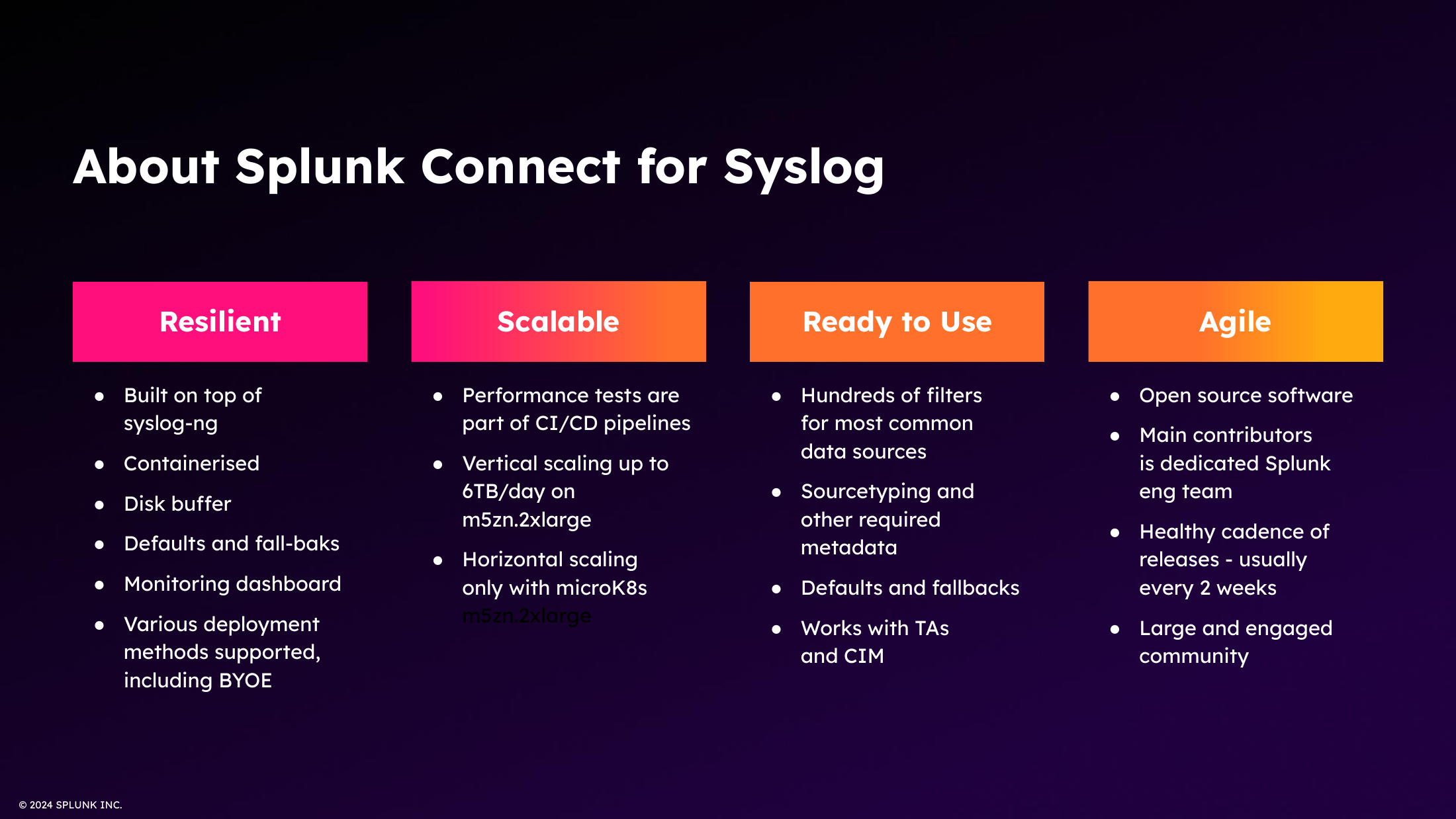
Official Splunk .conf24 slide. Claims shown in the slide belong to Splunk; capacity still has to be validated against your workload.
SC4S is a strong fit when:
- Splunk HEC is the approved destination.
- The source products and message formats are documented by SC4S.
- Consistent Splunk metadata matters more than custom output flexibility.
- Your team can operate Podman, systemd, persistent storage, certificates, and secret handling.
- Unmatched events will be monitored and corrected instead of ignored.
Do not choose SC4S simply because Splunk is the destination. If you already operate a reliable rsyslog and Universal Forwarder estate, require local files, or need heavy customization before Splunk pickup, replacing that path may add work without adding value.
When rsyslog Is the Right Choice
Choose rsyslog when the collector must remain independent of one analytics platform or when you need precise control over how messages are stored and forwarded.
rsyslog is useful as:
- A central file collector for Linux and network-device logs
- A relay across network or security zones
- A fan-out point for multiple destinations
- A pipeline that applies different rules to different inputs
- A file-based collection tier whose output is monitored by a Splunk UF or HF
- A native Linux service where a containerized collector is not appropriate
The flexibility is real, but so is the ownership. rsyslog does not know your retention policy, which senders are trusted, how a device should be classified, or what must happen when a destination is unavailable. Those decisions live in your configuration and operating procedures.
The current rsyslog documentation describes the pipeline as inputs feeding rulesets, which then invoke actions. Queues can isolate stages and absorb temporary downstream problems.
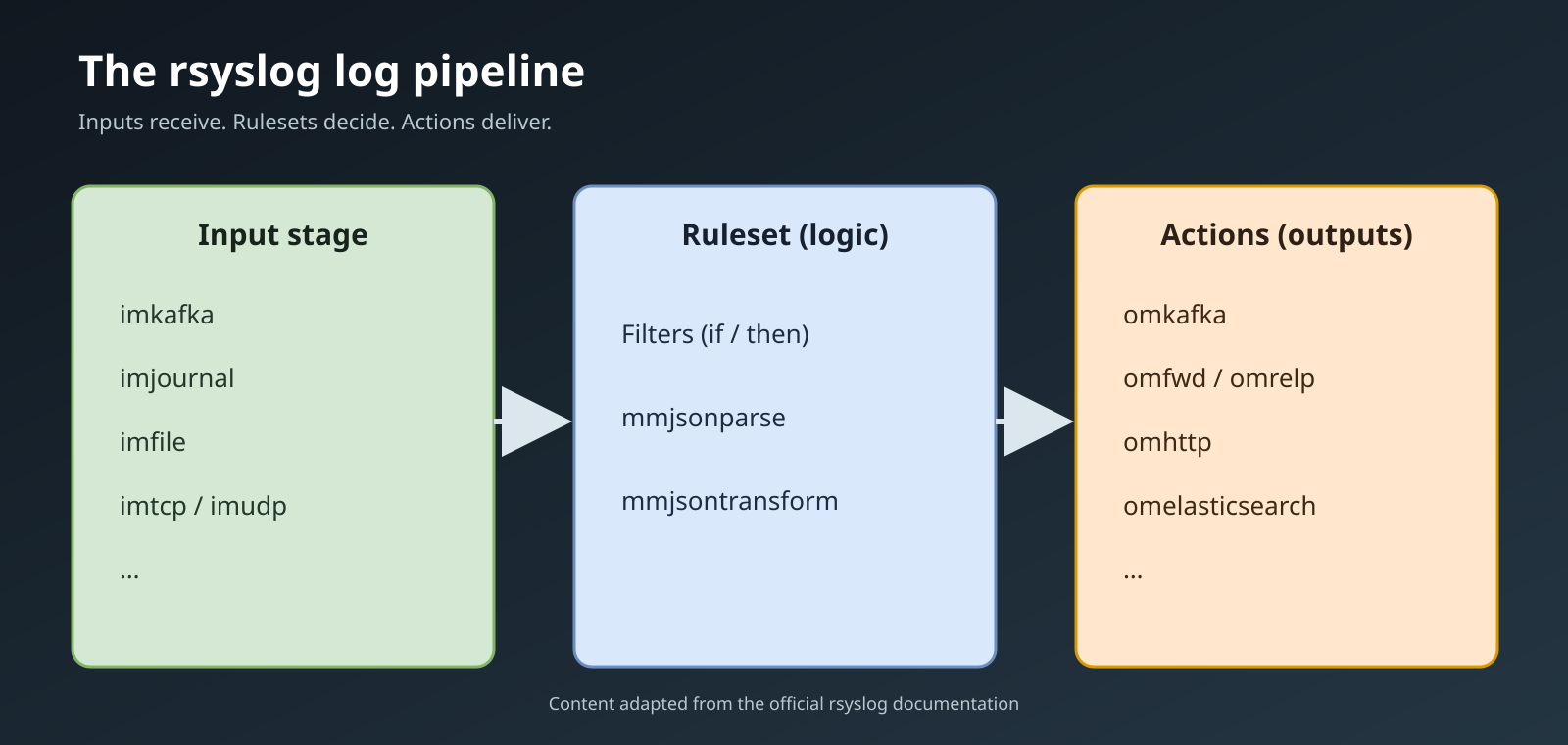
Pipeline labels and module examples come directly from the official rsyslog documentation. The layout was redrawn for legibility at blog width.
rsyslog with a Splunk Universal Forwarder
Splunk’s current Validated Architectures documentation explicitly includes rsyslog or syslog-ng combined with a UF or HF. The syslog service identifies the log types and writes them to files or directories. The forwarder monitors those paths and sends the data to Splunk using the Splunk-to-Splunk protocol.
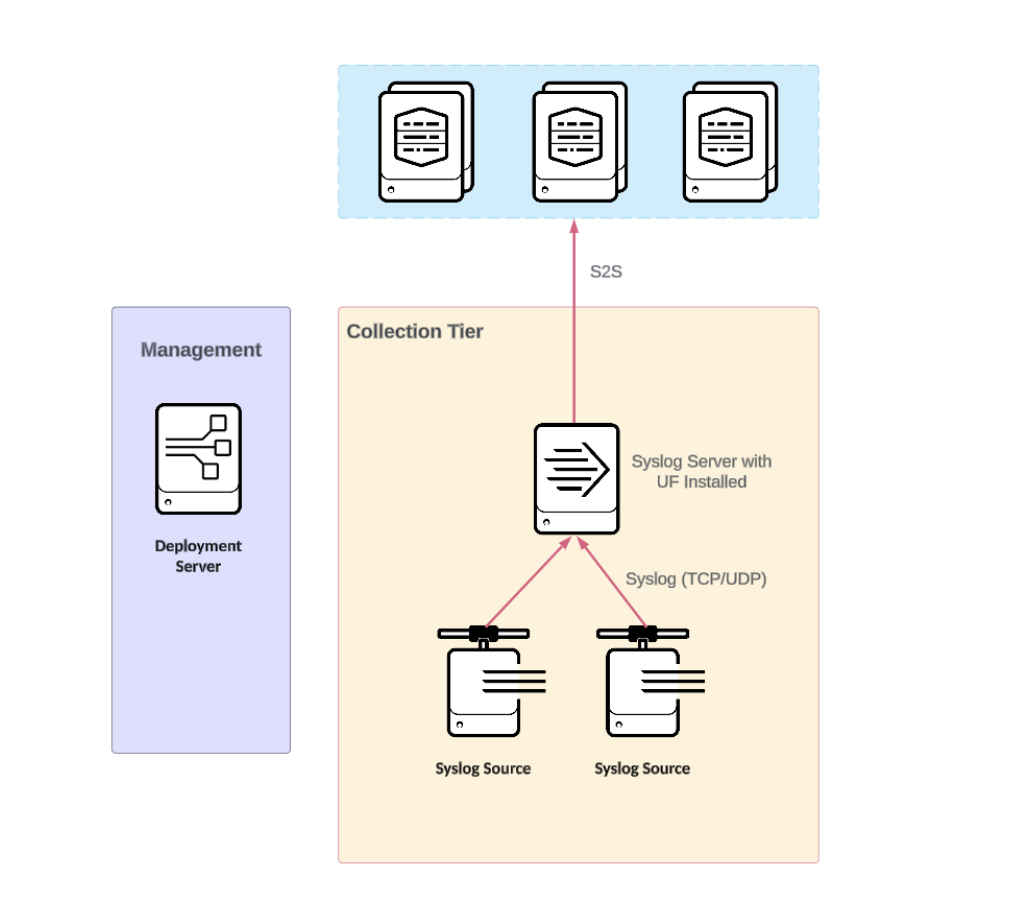
Official Splunk architecture diagram. The syslog server shown can be rsyslog; the forwarder monitors its files and sends them to Splunk.
This is a valid production pattern, especially where rsyslog is already standardized or local files are required. It can provide file-backed persistence, centrally managed UF configuration, encrypted Splunk-to-Splunk forwarding, and indexer acknowledgement where supported.
The work shifts to your team. rsyslog must separate the events correctly; the UF must have read access and accurate monitor stanzas; source, sourcetype, host, and index assignments must be deliberate; rotation must not cause missed or repeated data; and parsing that the UF cannot perform must occur at the appropriate Splunk parsing tier.
Do not choose rsyslog only because it is installed. A default Linux configuration plus a default UF is not a production collection tier.
What Each Choice Makes You Responsible For
With SC4S, you are operating an ingestion service. You must protect the HEC token, maintain certificate trust, ensure DNS and proxy requirements are correct, monitor the disk buffer, review fallback events, test upgrades, and prove that each device sends the format expected by its SC4S source page.
With rsyslog, you are designing the pipeline itself. You must decide how senders are recognized, where events go, which queues protect which actions, how long the system can buffer an outage, who can read the files, how those files rotate, and how lost or duplicated delivery will be detected. If a UF monitors the files, you also own its inputs, metadata, checkpoints, forwarding, deployment, and upgrade path.
Neither product creates unlimited durability. A buffer buys time; it does not remove the need for capacity planning. When storage fills, the design has reached a data-loss condition.
Can You Use Both?
Yes, when they have separate responsibilities.
A sensible design might use SC4S for supported appliance logs destined for Splunk and rsyslog for operating-system logs that require local retention or another destination. Give the services separate listener addresses or separate hosts, and document which senders belong to each path.
Avoid inserting rsyslog in front of SC4S without a specific requirement. A relay can alter sender identity or message headers, which may interfere with SC4S source detection. It also adds another queue, another failure point, and another place to troubleshoot.
Do not let both services compete for the same listener. Do not duplicate the same events into both paths unless duplicate ingestion is intentional, measurable, and budgeted.
Prerequisites: Know These Answers First
Before choosing either product, answer these questions using information from your own environment:
- Where must the events end up? Name the actual destination, not “central logging.”
- What sends the logs? Record each product, software version, message format, transport options, and failover capability.
- How much data arrives? Measure normal and peak event rates and average message size.
- How long must collection survive an outage? This determines buffer and storage requirements.
- Who owns the service? Assign certificate, secret, operating-system, monitoring, upgrade, and recovery responsibilities.
Do not copy someone else’s addresses, hostnames, tokens, proxy settings, retention periods, or certificate paths. The next two guides will show exactly where your approved values belong.
Steps: Make the Decision
- If Splunk is the destination, compare two complete paths: SC4S to HEC and rsyslog files monitored by a UF or HF.
- Prefer SC4S for a new source-aware HEC pipeline when its current source support covers the environment.
- Prefer rsyslog with a UF/HF when local files, existing syslog infrastructure, or extensive custom routing are requirements your team is prepared to own.
- If the destination is not Splunk, or the primary requirement is file storage, relay, or multi-destination routing, evaluate rsyslog first.
- If both are required, draw separate data paths and assign every sender to one of them.
- Reject the design until buffering, monitoring, ownership, security, and recovery have named requirements.
Verification
The decision is ready for implementation only when:
- The final destination is named.
- Every sender has an owner and a documented message format.
- SC4S support has been checked against the current source pages, where applicable.
- For an rsyslog-to-Splunk path, file layout, UF/HF access, monitor inputs, metadata, parsing tier, forwarding, and rotation behavior are documented.
- Event volume and outage duration—not guesswork—drive storage sizing.
- The team knows how it will detect a missing sender, a growing queue, fallback traffic, and a full disk.
- A failed proof of concept can return test senders to their previous destination.
Rollback
This article changes nothing, so there is nothing to undo.
During the later proof of concept, keep the existing logging path active until the new collector passes acceptance tests. If the test fails, restore each test sender’s previous destination and preserve the collector’s buffers, service logs, and failed events for diagnosis.
What Comes Next
Blog 2 will build SC4S with Podman and systemd, including HEC, DNS, proxy handling, certificates, secrets, persistent storage, fallback events, health checks, verification, upgrade, and rollback.
Blog 3 will build a modern rsyslog collector, including listeners, RainerScript rulesets, templates, queues, permissions, SELinux, firewall controls, rotation, monitoring, and an optional Splunk UF file-monitoring path.
Each article will stand on its own. You will not have to remove configuration for the option you did not choose.
Limitations
- Source support, variables, modules, and defaults can change; verify current documentation before deployment.
- UDP can lose messages, and plain syslog does not provide confidentiality.
- TCP connection success does not prove end-to-end durability.
- A single collector remains a single failure domain.
- This comparison does not replace product-specific capacity testing or a security review.
Sources
- Splunk Connect for Syslog: product goals and support
- Splunk Connect for Syslog: architecture guidance
- Splunk Connect for Syslog: supported sources
- Splunk Connect for Syslog: Podman and systemd
- Splunk .conf24: Getting Data In—Syslog Data Collection
- Splunk Validated Architectures: syslog data collection
- Splunk Universal Forwarder: monitor files and directories
- Splunk Universal Forwarder: capabilities and limitations
- rsyslog: the log pipeline
- rsyslog: pipeline stages and queues
- rsyslog: queue concepts